
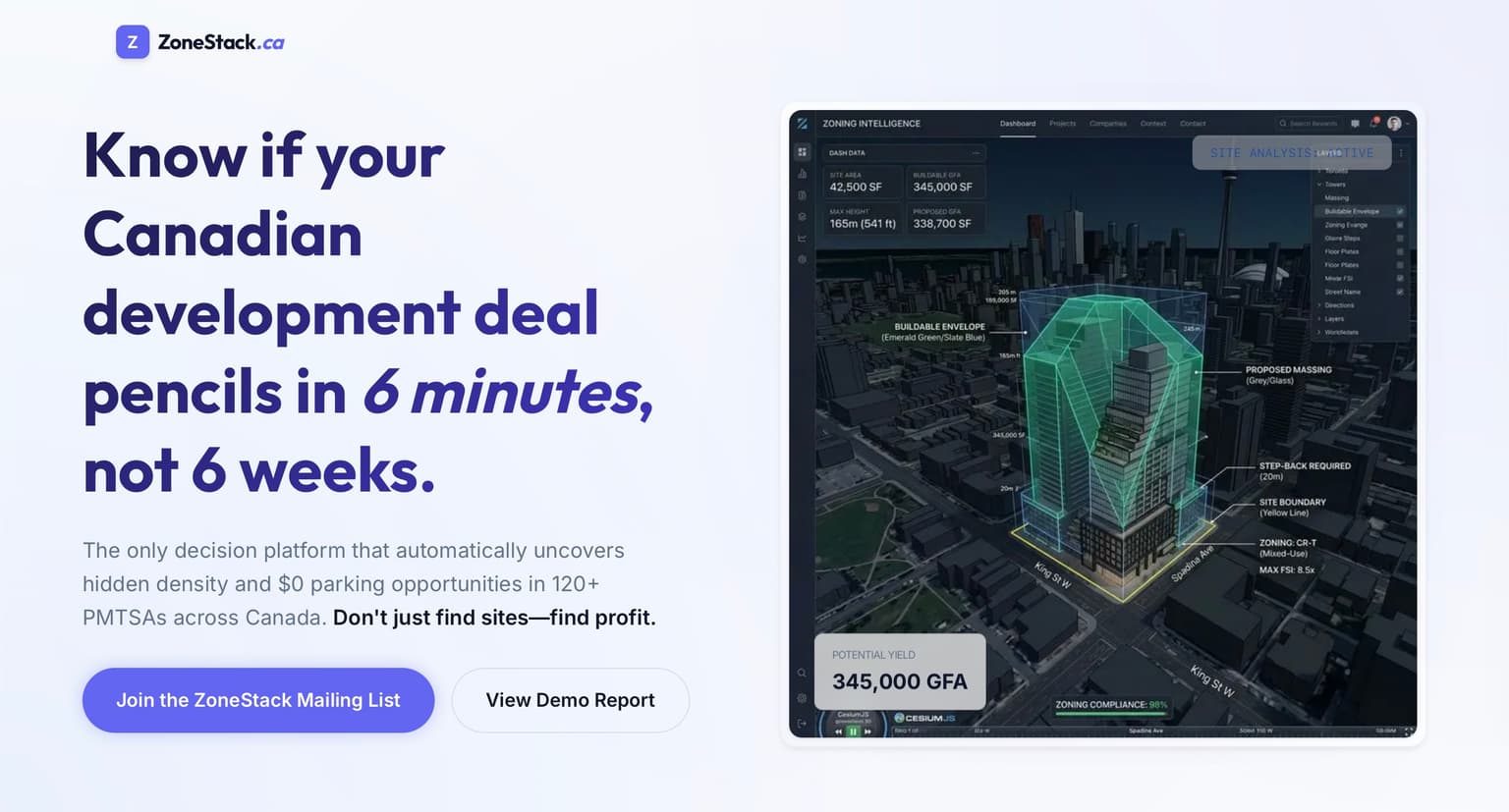
A landing page for a Prop-Tech company
ZoneStack Landing Page
🪪 Portfolio Summary ZoneStack is a Next.js landing page for a Canadian real estate decision-intelligence product...
Next.jsReactTypeScript
View project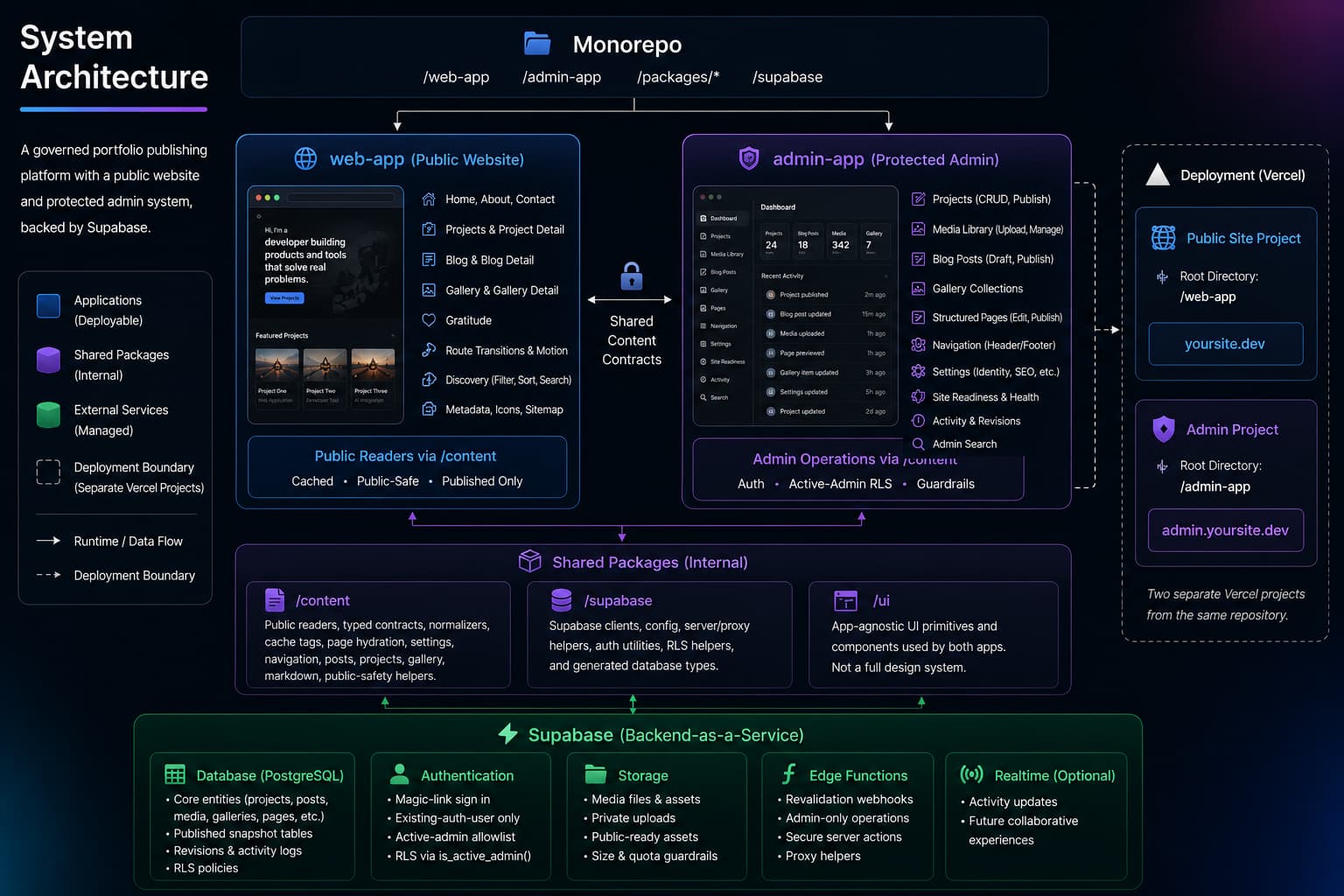
1-sys-arch.
Project detail
Project description
BW Portfolio is a full-stack personal portfolio platform built to present my software work with the same level of care as a product launch. What started as a premium developer portfolio evolved into a governed publishing system with a public-facing portfolio site, a protected admin dashboard, Supabase-backed content operations, structured page editing, media governance, and a custom route-motion system.
The project exists to solve a real portfolio problem: a static website is easy to launch but difficult to keep current, while a broad CMS can quickly become too generic, unsafe, or overbuilt. BW Portfolio takes a middle path. The public site stays polished, fast, and employer-facing, while the admin system provides constrained tools for editing Projects, Blog posts, Gallery collections, structured pages, site settings, navigation, and reusable media.
I built the project as a pnpm monorepo with two Next.js applications: web-app for the public portfolio and admin-app for authenticated content operations. Shared packages handle public content readers, Supabase access, typed content contracts, UI primitives, caching, and public-safety checks. Supabase provides the database, Auth, Storage, RLS policies, published content snapshots, media metadata, revisions, and activity logs.
As a portfolio piece, the project demonstrates full-stack architecture, product thinking, publishing workflows, security boundaries, media review systems, public UX polish, and long-term maintainability.
BW Portfolio is a personal portfolio website and content operations platform for presenting technical projects, writing, media, learning artifacts, and professional contact information. The public side is designed for employers, technical recruiters, engineering managers, clients, and collaborators who need to quickly understand what I build, how I think, and what kind of engineering work I am growing toward.
The public application includes portfolio pages such as Home, Projects, Project Detail, About, Contact, Blog, Gallery, and Gratitude. These routes are not just static pages; they are supported by typed content readers, structured page hydration, public-ready media checks, route-aware metadata, sitemap generation, and carefully designed motion behavior.
The Admin application is a protected operational workspace for managing the site. It supports project authoring, media review, Blog publishing, Gallery curation, structured page editing, navigation management, site settings, authenticated previews, readiness checks, revisions, rollback, activity logs, and guarded destructive actions.
The product concept is a portfolio that can be maintained like a small publishing system without becoming a generic page builder. Code owns the routes, templates, validation, layout, design system, and rendering contracts. Supabase stores approved content values, publish states, selected media, navigation rows, settings, and snapshots.
A professional portfolio has to do more than list projects. It needs to communicate taste, technical judgment, product thinking, credibility, and proof-of-work. At the same time, it has to remain easy to update as projects evolve, new media becomes available, and public/private boundaries change.
A purely static portfolio is simple, but it often becomes stale because every content update requires code changes. A generic CMS solves editing, but it can introduce too much flexibility: arbitrary layout changes, raw content execution, unclear publishing states, and weak boundaries between drafts and public content.
BW Portfolio addresses that gap by treating the portfolio as a purpose-built product. The public site remains custom and polished, while the admin system provides focused tools for known content types. The goal is not to build a universal CMS; the goal is to make this specific portfolio safer, easier to maintain, and strong enough to serve as proof of engineering capability.
This project also solves a self-referential challenge: the portfolio itself needs to become one of the strongest projects on the portfolio. That means the implementation has to demonstrate real architecture, not just visual design.
From a public visitor’s perspective, BW Portfolio behaves like a polished personal site. A visitor can browse projects, open case-study-style detail pages, view public-ready media, read Blog posts, explore Gallery collections, learn about my background, and reach contact or resume paths. The public experience is designed to feel editorial and product-like rather than template-driven.
From an admin user’s perspective, the system behaves like a focused content operations dashboard. After signing in through Supabase magic link authentication, an active admin can manage Projects, Blog posts, Gallery collections, Media Library assets, page content, navigation, settings, and publishing workflows. Draft and review content can be previewed before publishing.
The technical flow is centered on a publish boundary. Admin authoring tables hold editable content, while public readers only consume published and public-safe content. For structured pages, authoring data lives in pages and page_sections, while public delivery uses published_pages and published_page_sections. This allows draft edits to exist without immediately affecting the live site.
Media follows a similar safety model. Assets can exist in draft or review states, but public rendering requires them to be published, proof-approved, safe to share, captioned, alt-texted, and source-backed. Admin users can inspect private draft assets through authenticated preview URLs, while public visitors only see media that passes the public-ready checks.
The public app uses shared readers from packages/content, which normalize Supabase rows into typed content objects. Public readers are cached with shared cache tags and a one-hour revalidation contract. Admin mutations use centralized revalidation helpers to refresh relevant public paths and tags.
web-app public applicationadmin-app protected Admin applicationpackages/content shared content contracts and readerspackages/supabase shared Supabase clients and typespackages/ui shared UI primitivespnpm verify:phase45The project uses a split public/admin architecture. The public portfolio lives in web-app, while authenticated content operations live in admin-app. This separation keeps the public site focused on performance, polish, public-safe rendering, and route motion, while the Admin app can remain operational, dynamic, authenticated, and workflow-heavy.
The repository is organized as a pnpm monorepo. Shared packages prevent both apps from duplicating core logic. packages/content owns public readers, content normalization, typed contracts, cache tags, settings, navigation, page hydration, Projects, Posts, Gallery, Markdown, and public-safety helpers. packages/supabase owns Supabase clients, config, server helpers, and types. packages/ui holds only UI primitives that are genuinely shared across apps.
One of the most important design decisions is that the system is not a generic CMS. Code owns page templates, allowed sections, validation rules, fallback behavior, rendering components, routing, accessibility, motion, and visual design. Supabase stores structured content values, media selections, icon keys, publish state, navigation rows, settings, revisions, and activity records. This keeps the editing model flexible enough for a portfolio while preventing the database from becoming an arbitrary layout engine.
The structured page system uses separate authoring and public delivery layers. Admin editing happens against pages and page_sections, while public routes read from published_pages and published_page_sections. This avoids a common CMS failure mode where saved drafts accidentally become public content. It also enables preview-first publishing, readiness checks, fallback detection, and rollback.
Public Projects have a stricter rule: they are Supabase-only. If no published Supabase rows are available, the public Projects output should be empty rather than silently falling back to static placeholder projects. That decision keeps the public portfolio honest and prevents old placeholder content from appearing as real work.
The Admin dashboard uses Supabase Auth and active-admin RLS policies. The app does not create Auth users automatically. Instead, the first Auth user is manually created in Supabase, then allowlisted through admin_users. Signed-in users who are not active admins are routed to a pending state rather than being allowed into the dashboard.
The public UX includes a custom route-motion system. It supports persistent site chrome, page-belt transitions between top-level routes, edge navigation, card-to-detail entry transitions, detail-to-list return transitions, scroll restoration, media handoff overlays, and reduced-motion behavior. This was implemented as a system-level interaction layer rather than one-off animation sprinkled across components.
The media system is treated as a governance layer. Media assets carry metadata for publish state, proof approval, safe-to-share status, alt text, captions, source URLs, Storage paths, and video poster data. Admin users can create, review, select, order, archive, unarchive, and delete eligible assets through guarded workflows. Public rendering only uses assets that pass public-ready checks.
Caching and invalidation are centralized. Public content readers use shared cache tags and a one-hour cache contract. Admin mutations call helper functions that revalidate relevant paths and tags. Because the public and admin apps deploy separately, the architecture accounts for the fact that cross-deployment public invalidation may require an explicit public-app revalidation path.
I designed and built BW Portfolio as both a public-facing portfolio and a supporting content operations system. I made the core architectural decision to split the project into a public app and a protected Admin app, then organized the repository as a monorepo with shared packages for content logic, Supabase access, and reusable UI.
I built the public portfolio experience around a premium, product-like presentation rather than a generic developer-template layout. That included project presentation, structured page rendering, public discovery controls, media display, route-aware navigation, and a custom motion system for transitions between pages and detail views.
I also built the Admin workflow that makes the portfolio maintainable over time. This includes authenticated access, project editing, Blog editing, Gallery curation, Media Library review, structured page editing, preview-first publishing, readiness checks, revisions, rollback, activity logging, settings management, navigation editing, and guarded destructive actions.
A major part of my role was defining boundaries. I intentionally kept Supabase from becoming a generic layout engine, kept Markdown controlled instead of expanding into raw HTML or MDX execution, kept public Projects Supabase-only, and kept media publishing behind explicit safety and proof checks. Those decisions make the system more trustworthy and easier to reason about.
A portfolio needs to be easy to update without becoming a generic CMS.
I built a constrained Admin dashboard for known content types instead of adopting an open-ended page builder model. Code owns templates, routes, validation, and rendering. Supabase stores approved field values and publish states. This gives the portfolio dynamic content operations while preserving design control and safety.
Draft content, unsafe media, or admin/debug labels could accidentally leak into the public site.
The system uses published-only readers, public-ready media checks, RLS policies, public label audits, and structured published snapshots. Admin authoring data is separated from public delivery data, and media must pass proof, safety, caption, alt text, and source checks before appearing publicly.
Public Projects needed to remain honest and not silently fall back to outdated placeholder data.
Public Project readers are Supabase-only. If Supabase is missing, misconfigured, errored, or empty, the reader returns an empty list rather than overlaying static placeholders. This makes missing data visible as an operational/content issue instead of hiding it behind stale examples.
Rich route motion can easily introduce jank, scroll jumps, disappearing media, or accessibility issues.
I implemented route transitions as a dedicated public interaction system. It uses DOM snapshots, stable media measurement, scroll memory, fixed overlays, entry-open and entry-close states, route intent detection, edge navigation, and reduced-motion support. This keeps motion consistent and tied to the site’s navigation model.
Media is valuable proof-of-work, but it can also expose private or unfinished material.
I modeled media as governed content rather than simple files. Assets include public-safety metadata, proof state, captions, alt text, source references, publish state, and Storage information. Admin can preview draft/private assets, but public visitors only see assets that pass public-ready rules.
A long-running phased project can become hard to set up from scratch.
The Supabase setup now has a canonical fresh-project baseline under supabase/baseline. New environments use the consolidated schema, seed/bootstrap SQL, manual Auth user creation, and admin bootstrap template. Historical migrations remain available for existing projects and drift diagnosis.
BW Portfolio demonstrates full-stack product engineering beyond a typical personal website. It includes frontend presentation, backend data modeling, authentication, authorization, content workflows, media governance, caching, publishing safety, route interaction design, and operational documentation.
The project shows how I think about boundaries. I avoided broad CMS flexibility where it would weaken trust, avoided static fallbacks where they would make public content misleading, and avoided raw content execution where controlled Markdown was enough. Those choices reflect a preference for systems that are maintainable, safe, and honest about their state.
It also demonstrates iterative engineering maturity. The project evolved through many phases: static foundation, Supabase integration, Admin workflows, structured page hydration, cleanup and hardening, public route motion, media governance, and fresh-project setup. Each layer solved a real problem that emerged as the portfolio grew.
Next
A landing page for a Prop-Tech company
🪪 Portfolio Summary ZoneStack is a Next.js landing page for a Canadian real estate decision-intelligence product...
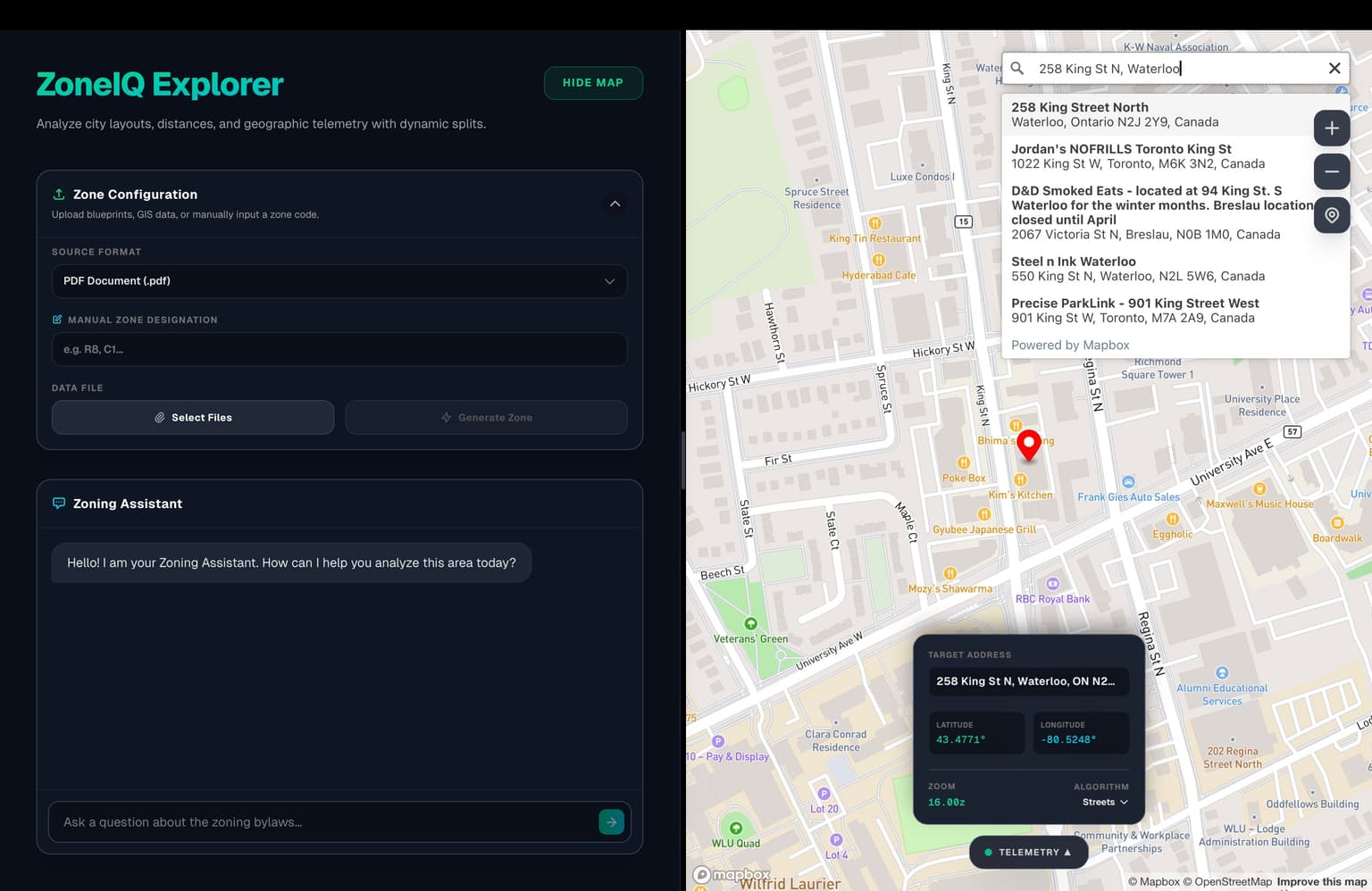
Frontend webapp developed as part of the ZoneIQ system.
🪪 Portfolio Summary ZoneIQ Explorer is a Next.js application that simplifies location-based zoning analysis by...
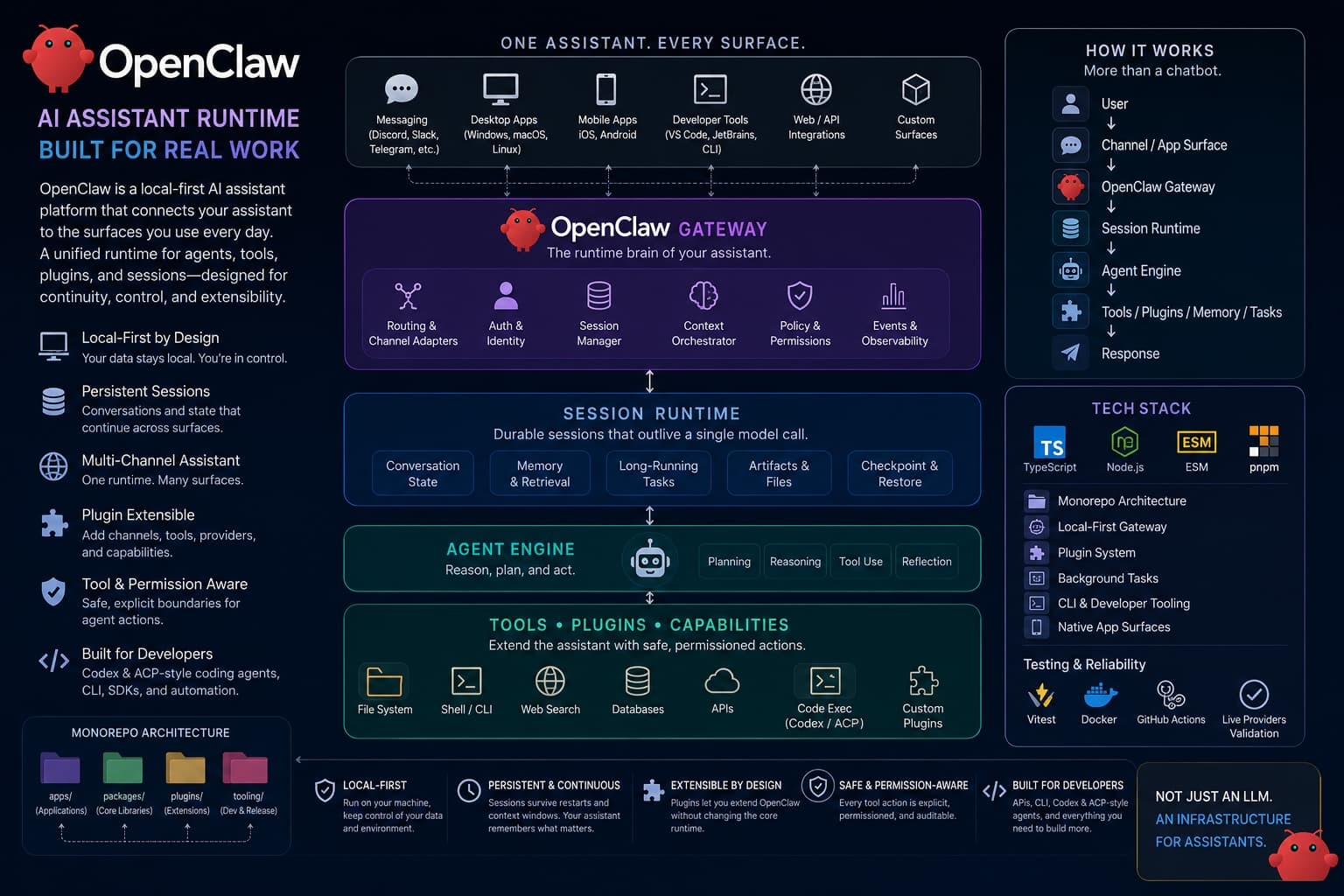
AI Infrastructure & Agent Runtime Exploration
🪪 Portfolio Summary OpenClaw is a local-first AI assistant platform that goes beyond the usual “chatbot in a...